

USR02 table is a standard SAP HANA table found in both SAP ERP and S/4HANA systems. It is a critical part of the core security architecture in SAP, storing essential user logon information, particularly related to authentication and password data. The table plays a vital role in user access control by managing logon attempts, storing hashed password values, and tracking account statuses and password expiration dates. This sensitive information is used by the SAP Kernel to authenticate users during the logon process, ensuring secure access to the system.
Content
- What are the most critical fields in table USR02?
- Common Use Cases for USR02 Table
- How to access table USR02?
- How to check which authorization group USR02 belongs to?
- How to list all tables in a particular authorization group?
- How to secure SAP USR02?
- How can smarterSec provide support?
- Conclusion
What are the most critical fields in table USR02?
The table USR02 is a critical SAP system table that stores essential user logon information, including authentication details, password hashes, account statuses, and password expiration data.
The most important and critical fields in the USR02 table are:
1. BNAME (User Name)
- Description: The unique identifier for a user in the SAP system. It is the user ID that is used during the login process.
- Why it’s sensitive: Since BNAME represents the specific user, it ties directly to all the permissions, roles, and access levels assigned to that user in the system. Unauthorized access to this field can lead to identity spoofing or privilege escalation.
Depending on the naming convention of the user provisioning you can link the username to real person, making this PII (Personally Identifiable Information)
2. CODVN (Password Hashing Mechanism Indicator)
- Description: Historically, there have been different hash mechanisms for passwords used in SAP systems. The CODVN field controls which password hashing mechanism is used for storing passwords in the system. It helps determine the encryption or hashing algorithm used to securely store the user’s password.
- Why it’s sensitive: The CODVN field is sensitive because it determines the strength and security of the password hashing mechanism in use. A weak or outdated hashing algorithm (such as MD5 or SHA-1) can make the stored password more vulnerable to attacks (like brute force or rainbow table attacks). If this field is compromised or exposed, attackers may gain insight into which algorithm is being used, which can potentially lead to the discovery of vulnerabilities in older or insecure hashing mechanisms.
3. PASSWORD / BCODE
- Description: This field contains the user’s password in a hashed or encrypted format. The actual password is never stored in plain text for security reasons.
- Why it’s sensitive: Although the password is stored as a hash, it is still highly sensitive. If the hash is exposed, attackers can attempt to crack it and gain access to user accounts. This field is a prime target for security breaches because it directly impacts user authentication.
Key Difference between PASSWORD and BCODE:
- The primary difference between BCODE and PASSWORD is that BCODE is the older and shorter hash format, which can make it easier to crack due to the potential use of weaker hashing algorithms and the absence of more modern enhancements like salting.
- PASSWORD, in newer versions of SAP, typically refers to the more secure, modernized storage format where stronger and more complex hashing algorithms (such as SHA-256 or other more secure mechanisms) are used, often with salting.
4. LOCKIND (Lock Indicator)
- Description: Indicates whether the user’s account is locked or unlocked. If the value is set, the user’s account cannot be used for logon, typically due to exceeding login attempts or security policies.
- Why it’s sensitive: This field is crucial for maintaining system security. If a user account is locked (e.g., due to suspicious activity), the LOCKIND field prevents unauthorized access. Exposing or manipulating this field can lead to unauthorized access by unlocking accounts or bypassing security measures.
5. PWSALTEDHASH (Salted Password Hash)
- Description: The PWSALTEDHASH field contains the user’s password stored as a hashed value with a “salt” (a random string). This is the most current and secure method of storing passwords in SAP. A salt is added to the password before hashing it. This random value ensures that even if two users have the same password, their hashes will differ, making it harder for attackers to guess passwords using precomputed hashes (e.g., via rainbow tables). This field stores the actual password hash, which is used for authentication when a user attempts to log in.
- Why It’s Sensitive: PWSALTEDHASH is extremely sensitive because it contains the user’s password in a form that is difficult to reverse-engineer without knowledge of the salt and the exact hashing mechanism used.
If an attacker gains access to the PWSALTEDHASH field, they can attempt to crack the password, but only if they also have information about the salt and the hashing mechanism. The salted hash is more secure than just a plain hash because the salt ensures that identical passwords result in different hashes.
The salted password hash is directly linked to user authentication, and if exposed, it could compromise user accounts, allowing attackers to perform unauthorized actions.
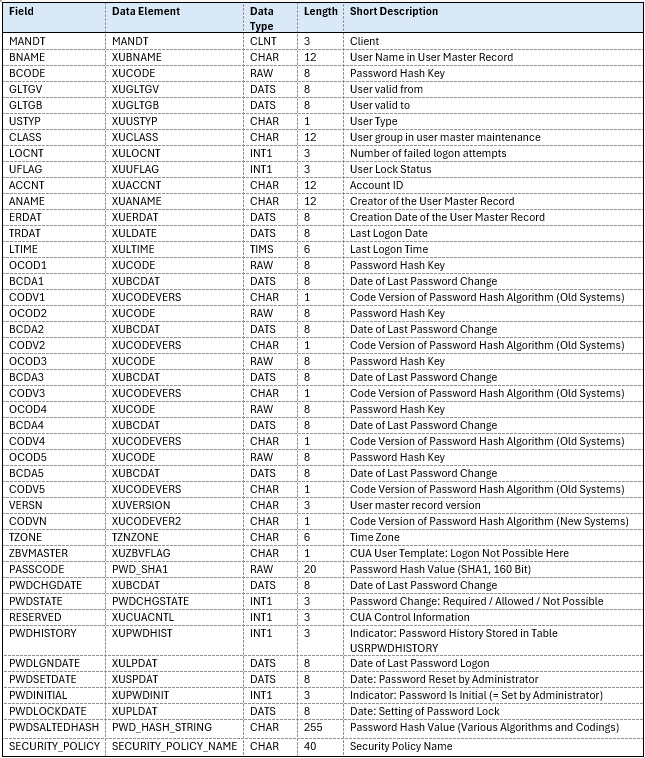
The following is the list of fields that are available in table USR02.
Common Use Cases for USR02 Table
SAP administrators and security specialists are responsible for managing user access in SAP systems. They perform actions to read or update the USR02 table, which contains crucial user login data such as passwords and account statuses, ensuring proper user authentication and system security.
- User Account Management: Administrators can query USR02 to check the validity of user accounts, lock status, or password-related details.
- Password Audits: Checking the PASSCODE field to audit password status or verify secure login settings.
- User Lock and Unlock Management: Using the LOCKED field to determine if a user’s account is locked, and when it was last locked.
- Access Control and Security Audits: The table helps administrators ensure that only authorized users have access, and it can be used to verify expired accounts or enforce access controls.
- Inactive User Detection: Querying the GLTGB (valid-to) field to identify inactive or expired user accounts that need to be deactivated or removed
How to access table USR02?
There are several ways to access the USR02 table in SAP:
All these different methods to access the data with the standard transactions will automatically perform an authorization check against the table’s authorization group (authorization object S_TABU_DIS).
How to check which authorization group USR02 belongs to?
Authorization Groups are used as part of the authorization concept to restrict access to specific objects or data within a system. They enable system administrators to manage user permissions by grouping certain objects or transactions together and controlling access to them based on the user’s role and the group they belong to.
To check which authorization group USR02 belongs to,
- Go to transaction SE11.
- Enter the table name “USR02” and click display.
- Use Utilities → Assign Authorization Group to view the authorization group.
A dialog box will appear showing you the Authorization Group that is assigned to the table along with its description. This is where you can see the Authorization Group (e.g., “SPWD”, “SU” or another group) associated with the table “USR02”.
How to list all tables in a particular authorization group?
Once you know the authorization Group assigned to a table, you can list all tables that belong to that authorization group by querying the relevant data in SAP.
- Go to transaction SE16.
- Enter table Name TDDAT.
- In the CCLASS field, enter “XX” (your authorization group).
- Execute the query to see all tables assigned to the “XX” authorization group.
How to secure SAP USR02?
USR02 table in SAP contains sensitive user authentication data, including password hash values and other crucial details related to user login and password management. Given its critical role in user security, it is essential to implement stringent measures to protect the table from unauthorized read access.
1. Protection against accesses from outside (using SQL)
It is recommend that you prevent direct accesses to the database tables (for example, by using firewalls). Otherwise, the ABAP system cannot control accesses efficiently.
2. Protection against accesses using own ABAP programs
Your own ABAP programs to access any tables directly. It is therefore imperative that you adopt a restrictive approach when assigning development authorizations in production systems (SAP Note 13202).
In this context, debugging authorization (including the authorization to change variable contents or influence the program flow) is regarded as the same as having the authorization to create and execute your own ABAP source code.
3. Protection against accesses using existing generic tools
You can access the table USR02 using the table browser (transaction SE16 or SE17 or by navigating from transaction SE11). In this case, the system will check for the table authorization group (authorization object S_TABU_DIS, see SAP Note 26909).
See SAP Note 1133739 for more information.
The table USR02 is assigned to the table authorization group ‘SC’. (You can use transaction SE54 to manage this authorization.)
4. Protection against exports of table contents using transports
Due to corrections and transports, table contents can be exported using transport requests. Therefore, you must adopt a restrictive approach when assigning authorizations for managing transport requests (authorization object S_TRANSPRT, activity 01, and so on).
5. Protection using Generic Table Browser (GTB).
In the Generic Table Browser (GTB) the standard transactions like SE16N are replaced by S416N, that allow a more detailed approach to control the authorizations for accessing table contents.
To protect the USR02 table in SAP and prevent sensitive fields like BCODE, PASSCODE, and PWSALTEDHASH from being exposed via modern GTB. The data access can be configured in a way, that access to critical columns can be excluded from the display.
How can smarterSec provide support?
As a specialized SAP security and compliance company, smarterSec plays a pivotal role in safeguarding sensitive data stored in the USR02 table, which holds critical user authentication information in SAP systems. Additionally we offer SAP Security Risk Assessments which is a quick and easy way to efficiently analyze the current security and compliance level of one of your SAP systems and have it assessed by our experienced SAP Security & Compliance experts.
Conclusion
USR02 table is essential for administrators and security professionals within SAP systems. It provides valuable insight into user account management and security practices by storing critical information such as authentication credentials, password hashes, and account status. While this data is critical to ensuring secure access to the system, it also represents a potential vulnerability if not carefully monitored and protected. By understanding the structure and function of the USR02 table, organizations can improve their security posture, identify potential entry points for attackers. Therefore, proper management and auditing of USR02 is essential to maintaining a secure SAP environment.
SAP documents on USR02
Related Topics: smarterSec Security Platform // SAP Security Risk Assessments